What Keyboard to Buy Piano: A Practical Guide
Discover how to choose the best keyboard for piano applications, from touch and action to sound engines, connectivity, and value. This guide breaks down goals, tests, and setup for keyboard enthusiasts, students, and pros seeking a piano-like playing experience.


Looking for what keyboard to buy piano-ready setup? This guide helps you choose a keyboard that mirrors piano feel while offering practical features for practice, recording, and performance. You’ll learn how to compare touch, weight, and action, test candidates effectively, and pick a model that fits your budget and space. By following this plan, you’ll avoid common missteps and find the best match.
Understanding the piano-keyboard distinction
For many musicians, the choice between a traditional piano and a modern keyboard comes down to action, key count, and amplification. A piano’s hammer-action feels heavy and consistent across the keyboard, while a typical electronic keyboard uses lighter, spring-based action. The challenge for players who want a genuine piano experience is finding a keyboard that mimics that weight, touch, and rebound without sacrificing portability or features. According to Keyboard Gurus, the most critical factor for piano players is authentic touch—how the key responds to your playing style under velocity and dynamic changes. A well-chosen 88-key instrument with weighted or hammer-action keys makes long practice sessions more productive and reduces the friction of transitioning between digital and acoustic tones. The goal is to align feel and response with your preferred repertoire, whether you are practicing scales, arpeggios, or expressive passages from classical and contemporary pieces.
Key features to match your piano playing needs
To replicate piano behavior, you’ll prioritize action type, key count, velocity response, and tonal realism. The main action families are weighted-action and hammer-action. Weighted keys simulate heavier touch, while hammer-action provides a heavier feel toward the low end and becomes lighter as you move up the board. Graded hammer action further refines this by making higher keys slightly lighter, mirroring an acoustic piano. In addition to touch, consider the keyboard’s 88-key coverage, polyphony (the number of voices that can be produced simultaneously), and the depth of the built-in sounds—especially piano timbres. Keyboard Gurus analysis shows that players who want authentic practice tend to favor 88-key boards with graded hammer action and a solid sustain system. If you regularly perform or record, look for a robust reverb, natural-sounding damper, and a realistic pedal feel.
How to test keyboards like a pro
Testing in-store or at a demo station requires a structured approach. Bring your own music or a familiar piece so you can compare how different keyboards handle legato, staccato, and repeated notes. Pay attention to key travel, aftertouch (if available), velocity sensitivity, and how the action handles rapid passages. Use a metronome to check timing stability and listen for any audible keyboard noises during heavy use. Create a simple rubric with: touch feel, tone quality, pedal feel, and overall ergonomics. Keyboard Gurus recommends testing with headphones or your preferred speakers to hear subtle differences in brightness and decay. For players who practice for hours, comfort and consistency across the entire keyboard matter as much as immediate wow-factor.
How action and touch influence musicality
Touch is more than a sensation; it governs phrasing, dynamics, and articulation. A reliable weighted or hammer-action keyboard reveals accurate dynamic control, allowing you to shape musical lines with confidence. Consider velocity curves—the mapping from how hard you strike a key to the resulting loudness. Some boards offer multiple curves or adjustable sensitivity so you can tailor feel to your technique. Gradation of resistance across the keyboard helps with finger independence and precision, especially in fast passages. If you are composing, ensure the keyboard’s velocity response aligns with your software or external synthesizers. In short, action quality directly impacts your expressive capacity and endurance during long practice sessions; invest in touch that feels natural under your fingers.
Connectivity, sound engines, and output options
Your setup will depend on whether you’re practicing at home, performing live, or producing music. Look for robust MIDI over USB, reliable Bluetooth audio streaming, and balanced outputs for stage use. A strong internal sound engine matters for instrument realism; many piano players prefer keyboards with high-quality piano samples and a capable reverb/damper system. Build quality and stability of the stand and chassis also influence long sessions. When possible, audition the keyboard with your preferred headphones and monitors to verify the tonal balance and speaker brightness. The goal is seamless integration with your DAW, virtual instruments, pedals, and external amplifiers without latency or calibration issues.
Build quality, weight, and portability
If you travel or perform, weight and build quality become deciding factors. Heavier boards often feature sturdy metal frames and heavier action that better resist flex and unwanted movement during intense playing. Lighter, portable options may feature foldable stands and compact footprints, but these often compromise action or key count. For piano players, prioritize a rigid chassis, high-quality keybed, and reliable pedal assembly. A well-built keyboard reduces maintenance costs and improves comfort during long sessions. Additionally, consider how the board will sit on your desk or stand—ergonomics impact posture, reach, and finger alignment. A stable instrument is essential for accurate rhythm and timing.
Budgeting and value: what to expect
Budgeting for a piano-like keyboard means balancing touch realism, feature depth, and future-proofing. Entry-level digital pianos and stage keyboards offer good action and sound for beginners or casual players, while mid-range devices deliver more realistic piano timbres and better keybeds. Premium options provide the most authentic hammer-action experiences, richer samples, and expansive connectivity, which can justify the higher price for serious players. Keyboard Gurus recommends assessing long-term value: a slightly higher upfront cost may pay off in more effective practice, fewer upgrades, and greater reliability over time. Be wary of bargain models that cut corners on action, durability, or tonal authenticity. Focus on the combination of weight, felt-quality, and tone fidelity to ensure a satisfying piano-like performance.
Recommended keyboard categories for piano players
- Digital pianos with 88 weighted or hammer-action keys: aim for graded action and realistic pedal response.
- Stage keyboards with fully weighted keys: prioritize portability without sacrificing touch accuracy.
- Digital workstations and MIDI controllers with 88 keys: extend versatility for composition and recording.
- Hybrid pianos: blend acoustic-like feel with modern features and connectivity.
- Compact 76–78 key boards: useful when space is limited, but verify action quality and key size.
Each category serves different goals—practice, performance, or production. For piano players, prioritize 88 keys, authentic action, solid construction, and reliable connectivity. The ideal choice aligns with your practice routine, repertoire, and the space you have available.
Ergonomics, placement, and practice setup
Your environment can affect your playing ease and technique. Position the keyboard at a height where your forearms rest parallel to the floor, with the instrument centered to avoid wrist strain. If you use a stand, ensure it’s stable and does not vibrate during heavy playing. Consider a dedicated practice area with good lighting and minimal distractions. Use a comfortable chair with proper back support and foot positioning to maintain balance while executing complicated passages. A practical setup includes a mirror to observe posture and a metronome for timing discipline. Over time, your space should encourage consistent practice without fatigue or discomfort. Keyboard Gurus notes that a thoughtful arrangement consistently improves technique and learning pace.
Authoritative sources and further reading
- Authoritative sources such as the Audio Engineering Society (AES): https://www.aes.org/
- MIT Press: https://mitpress.mit.edu/
- National Institute of Standards and Technology (NIST): https://www.nist.gov/
These resources provide broader context on sound design, measurement, and the standards that underlie digital keyboard technology. While not all content is specific to keyboard buying, they help frame expectations about how touch, tone, and output quality are engineered in modern keyboards.
Final quick-start checklist
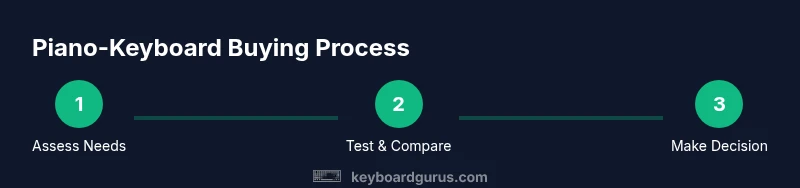
- Define your piano playing goals and must-have features.
- Test touch response, key count, and action across multiple models.
- Compare overall tone, sustain, and pedal quality with your reference piano.
- Check connectivity options, software compatibility, and updateability.
- Assess build quality, weight, and your space constraints before buying.
Tools & Materials
- Test keyboard or digital piano (88 keys, weighted/hammer-action preferred)(Primary instrument for comparing touch and feel against your reference piano)
- Headphones or quality speakers(Critical for accurately judging touch response and tonal balance)
- Music stand and sheet music or practice pieces(Useful for realistic evaluation during tests)
- MIDI/USB cable or Bluetooth adapter(Optional for auditioning with DAWs or samples)
- Notebook or note-taking app(Record impressions on action, feel, tone, and fitness for your setup)
Steps
Estimated time: 60-90 minutes
- 1
Define your piano-playing goals
Clarify whether you need practice, performance, or recording capabilities. List must-have features and an ideal action profile, then rank priorities (touch realism, sound quality, budget).
Tip: Write down three signature pieces to test the keyboard against during evaluation. - 2
Inventory potential options
Create a short list of 4–6 models that match your priorities. Include a mix of 88-key weighted-action boards and portable options for comparison.
Tip: Ask store staff to demonstrate each model under quiet conditions and with your references. - 3
Test touch and action
Play scales, arpeggios, and a few challenging passages. Note key travel, rebound, and how action changes across the keyboard. Compare to your reference piano.
Tip: Use a metronome to ensure consistency in response and timing. - 4
Assess tone and pedal feel
Listen for tonal balance across registers, sustain, and how accurately the damper pedal translates intent. Pedal feel should be natural and repeatable.
Tip: Test both half-pedaling and full-pedal modes when available. - 5
Check connectivity and software compatibility
Verify MIDI, USB, and audio outputs; ensure any software or DAW you use integrates smoothly. Consider Bluetooth if you plan wireless play/monitoring.
Tip: Bring your laptop or tablet to confirm driver and software compatibility. - 6
Evaluate build quality and ergonomics
Inspect chassis rigidity, stand stability, and weight distribution. Ensure comfortable reach for your typical playing posture.
Tip: If possible, test for 15–20 minutes to assess fatigue and comfort. - 7
Make a decision with a safety margin
Choose the model that best matches your core needs, with some room to grow. If uncertain, consider a purchase window or return policy that minimizes risk.
Tip: Prefer models with a generous return window to test at home with your full setup.
Got Questions?
What is the difference between weighted keys and hammer-action keys?
Weighted keys simulate resistance similar to acoustic pianos, while hammer-action keys use mechanisms to replicate hammer dynamics. Hammer-action tends to feel closer to a real piano and is preferred by many serious players, especially when combined with graded action. Consider your budget and how closely you need to mimic an acoustic instrument.
Weighted vs hammer-action keys mimic different piano experiences. Hammer-action often feels more like a real piano and is preferred by serious players, depending on your budget.
Do I really need 88 keys for piano practice?
For a long-term piano practice workflow, 88 keys provide full range and consistency with standard piano repertoire. Some players may start on 61 or 73 keys, but you may outgrow those options as you progress. If space or budget is tight, prioritize models with robust range and authentic action rather than fewer keys.
88 keys are ideal for full-range piano practice, though 61 or 73-key models can work briefly if you plan to upgrade later.
What’s the difference between a digital piano and a keyboard for piano playing?
Digital pianos typically feature 88 weighted keys and built-in amplification, designed for authentic piano practice. Keyboards are often lighter, with varying key counts and actions, and may rely on external amplification. Choose digital pianos for realism and keyboards for portability and modular setups, depending on your priorities.
Digital pianos offer piano-like feel with built-in sound; keyboards are lighter and more modular, great for travel and composition.
What is graded hammer action?
Graded hammer action means the lower keys feel heavier and the higher keys feel lighter, which more closely mimics an acoustic piano. This is important for developing proper technique and dynamic control across the keyboard. If available, test multiple keys to confirm the gradation matches your preference.
Graded hammer action makes the bottom keys heavier and the top keys lighter, improving realism and technique.
How do I test touch response effectively?
Play scales, arpeggios, and a challenging passage with varied dynamics. Listen for consistent velocity response and smooth transitions. Use a metronome to verify timing stability and ensure the keyboard responds predictably to attack and release.
Test touch with scales and arpeggios; ensure consistent response and timing with a metronome.
Can I connect a keyboard to software and external speakers?
Yes. Look for USB MIDI, traditional MIDI ports, and line-level outputs. Bluetooth can be convenient but may introduce latency. Ensure compatibility with your DAW and any plug-ins you rely on, and test latency during your audition.
Yes, you can connect to software and speakers; check MIDI, outputs, and latency during testing.
Watch Video
What to Remember
- Define needs before shopping and set clear priorities.
- Prioritize 88-key weighted or hammer-action for authentic piano feel.
- Test touch, tone, and pedal response with a structured rubric.
- Check connectivity and software compatibility early.
- Choose a model with solid build quality and an upgrade path.