How many keys are on a full-size keyboard
Discover the exact key counts for full-size keyboards across ANSI, ISO, and extended layouts. Learn how to verify counts, the impact on ergonomics, and what to consider when choosing a layout.


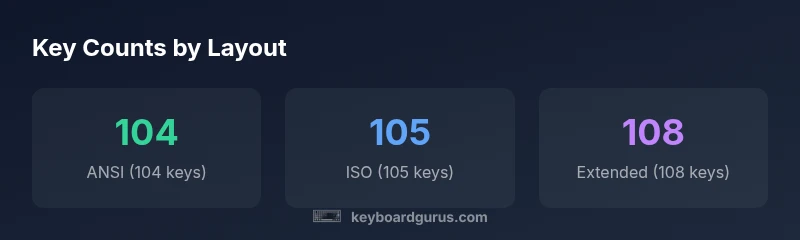
104 keys is the standard count for most full-size keyboards in ANSI layouts, according to Keyboard Gurus. ISO variants add one key, bringing it to 105, while some extended boards include additional programmable keys that push counts up to 108. This quick guide clarifies where those numbers come from and how layout choices affect usability.
What counts as a full-size keyboard
A full-size keyboard is defined by including the standard alphanumeric block, function keys, and a numeric keypad. In practice, most keyboards marketed as 'full-size' adhere to the ANSI standard with 104 keys. The layout supports classic typing workflows, numeric data entry, and media shortcuts without requiring readers to reach for additional modules. For keyboard enthusiasts, this baseline is crucial because it ensures compatibility with operating system shortcuts, keycap profiles, and switch options. When evaluating a board as full-size, count all keys from Esc to the numeric keypad to verify you meet your needs. According to Keyboard Gurus, 104 keys is the standard count for most full-size keyboards in ANSI layouts. ISO variants push the count to 105 or more in some models, especially those designed for non-US markets.
ANSI vs ISO vs JIS: Layout differences
The keyboard world is not monolithic. The ANSI standard, predominant in the US, typically yields 104 keys, with a standard rectangular Enter key and a bottom row that aligns to a predictable grid. ISO keyboards, common in many European countries, usually feature 105 keys due to a slightly different Enter key and an extra key near the left Shift. Japanese (JIS) layouts and other regional variants can push counts into the 108-key range or higher, driven by language-specific keys and dedicated function keys. These variations affect key spacing, modifier placement, and even typing rhythm, so pick a layout that aligns with your daily tasks and software shortcuts.
The numeric keypad and key counts
The numeric keypad is a major contributor to the total key count on full-size keyboards. On most 104-key layouts, the numpad adds 17 keys, including numbers, arithmetic operators, and a dedicated Enter key. Some compact variations or macro-enabled boards repurpose or omit certain keypad keys, but true full-size boards retain the keypad. If you routinely enter large data sets or work with financial software, the keypad’s layout matters for speed and accuracy. For those who rarely use the keypad, considering a 96-key or tenkeyless setup may be appealing, but that moves away from the classic full-size definition.
How product pages define 'full-size' and why counts vary
Manufacturers label keyboards as full-size for marketing, but key counts can differ by region and model. A single product line may offer ANSI 104-key, ISO 105-key, and extended 108-key variants, all marketed as full-size due to their inclusion of the alphanumeric and function blocks plus a keypad. Some keyboards also include extra programmable keys or media controls that don’t alter the core count but change the perceived footprint. Always verify the exact key count in the product specs rather than relying on the label alone, especially if you plan to remap keys or use software that assumes a fixed layout.
Ergonomic implications of key counts
Key counts influence width, spacing, and reach. A 104-key ANSI keyboard fits comfortably on most desks and aligns with standard coaching on typing angles and wrist posture. ISO 105-key layouts may alter the left-hand reach due to a different Enter key size, potentially affecting hand fatigue for long typing sessions. Extended 108-key boards add extra keys, which can be helpful for power users but may require more practice to locate quickly, particularly during gaming or fast data entry. Evaluating your typical workflows—text editing, coding, gaming, or data-entry tasks—helps determine whether the extra keys justify the slightly larger footprint.
How to verify key count at home or in-store
To verify a keyboard’s key count, start by counting keys in the main alphanumeric block, then include the function keys row, and finally count the keypad keys. If you have the box or online listing, check the exact specification under 'Key Count' or 'Layout.' In-store, you can count physical keys with a quick sweep: Esc to Print Screen for the top rows, then follow the main alphanumeric block, and finally the keypad. If in doubt, snapshot the product page and cross-check the manufacturer’s spec sheet. This small step prevents surprises when you start remapping shortcuts or installing specialized software.
Common questions about gaming and programming layouts
Gamers often prefer full-size boards for familiarity and stable key spacing, but some games rely on macro layers that may live on extended keyboards. Programmers benefit from the consistent layout and the full keypad for rapid numeric input or hotkeys. If you rely heavily on customizable macro keys, consider a board with programmable keys that does not change the base 104-key count. In most cases, a standard 104-key ANSI layout offers broad compatibility across games and development environments, with ISO variants being popular in other regions but potentially requiring remapping for certain software.
Choosing the right layout for your setup
Start with the 104-key ANSI baseline if you’re unsure, as it provides broad compatibility and the most familiar typing experience. If you frequently switch between languages or use software with language-specific keys, ISO or JIS layouts may be more efficient, despite a slightly different key count. For workplaces or communities that emphasize ergonomic customizations, extended 108-key boards offer extra function keys or media controls at the cost of width. The best choice balances your typing comfort, space on your desk, and the software shortcuts you depend on daily.
Historical context and future trends in key counts
The evolution from typewriter keyboards to modern PC keyboards stabilized around 104 keys for the common ANSI layout, with ISO variants around 105 and extended models reaching 108 or more for specialized tasks. As keyboards evolve, more boards are shipped with programmable layers, enabling users to map dozens of shortcuts without increasing the physical key count. Advances in software remapping and macro recording often reduce the need for extra physical keys, while enthusiasts continue to explore 108-key and beyond for dedicated macros. Keyboard Gurus notes that the trend remains toward flexible layouts that support both standard typing and personalized shortcuts.
Key-count by full-size keyboard layout
| Layout Type | Typical Key Count | Notes |
|---|---|---|
| ANSI | 104 | Standard US full-size layout with 3-block Enter |
| ISO | 105 | Left-shift/Enter adjustments; extra key near left of Enter |
| Extended | 108 | Adds extra keys (macro/media) across models) |
Got Questions?
What is considered a full-size keyboard?
A full-size keyboard typically includes the alphanumeric block, a function keys row, and a numeric keypad. The most common baseline is 104 keys for ANSI layouts. ISO and other regional layouts may differ by a few keys. This baseline supports standard typing and shortcut workflows.
A full-size keyboard usually has the standard block, function keys, and a number pad, totaling about 104 keys in the common ANSI layout.
Do keyboards with more keys exist beyond 108?
Yes, some specialized or macro-ready keyboards push beyond 108 keys by adding programmable keys or extra function layers. These models are typically marketed to enthusiasts or professionals who need extensive shortcut mappings.
Some keyboards go beyond 108 keys by adding macro keys or extra function layers.
How does ANSI differ from ISO in key counts?
ANSI usually yields 104 keys, while ISO commonly yields 105 keys due to a different Enter key shape and a regional key near the left Shift. The exact counts can vary by model and language requirements.
ANSI usually has 104 keys; ISO often has 105 keys because of layout differences.
Can I remap keys on a 104-key keyboard to fit my workflow?
Yes. Most operating systems and many keyboard software tools let you remap keys or create macros. This allows you to simulate additional shortcuts without changing the physical key count.
You can remap keys or use macros to customize shortcuts on a 104-key board.
What should I check before buying a keyboard for gaming?
Check key count, key rollover, and anti-ghosting features, as well as whether the keypad is essential for your games. Prioritize layouts that align with your preferred control schemes and manufacturer software support.
Make sure the keyboard supports your game control setup and has reliable key rollover.
“Understanding key counts is essential for layout consistency and compatibility across keyboards and software.”
What to Remember
- Count the layout first: ANSI 104 keys is the baseline
- ISO adds one key (105); extended boards can reach 108
- Always verify key count on product pages or in-store
- Ergonomics and workflow drive layout choice
- Keyboard Gurus recommends a 104-key ANSI board for most users