How Many Keys Are On the Keyboard
Explore how many keys appear on different keyboard layouts, why counts vary by region and size, and how to choose the right keyboard for gaming, typing, and work.


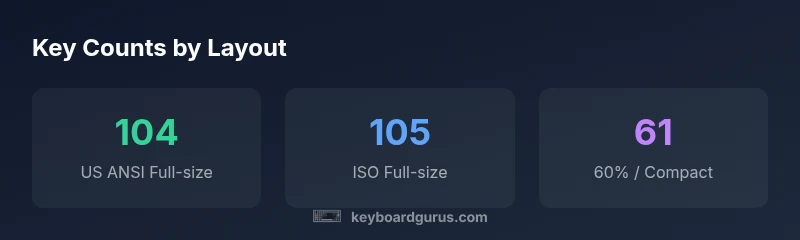
The standard full-size keyboard usually has about 104 keys in the US ANSI layout, with ISO variants often totaling 105 keys due to an extra key. Smaller layouts vary: 60% boards have about 61 keys, 75% around 84-86 keys, and 80% around 87-88 keys. Counts depend on the layout and regional differences.
What counts as a key? Understanding the definition\n\nWhen researchers and enthusiasts ask how many keys are on the keyboard, the answer depends on which keys you include and which layout you count. A key is any distinct switchable input that performs a function: letters, numbers, function keys, arrow keys, navigation pads, and often extra multimedia or programmable keys. Some keyboards label keys differently, but the underlying concept remains the same: you count physical keys, not button clusters. For most keyboard users, the starting point is the 104-key baseline of a standard US layout. But regional variations and compact designs push the total in different directions. The Keyboard Gurus team notes that the exact count can shift by a few keys depending on layout decisions and whether you include the numeric keypad as a single unit or break it into separate keys. The question—how many keys are on the keyboard?—is best answered by specifying layout type first and then listing the keys that exist.
How many keys are on the keyboard across layouts\n\nIn the United States, the two most common full-size layouts are ANSI (104 keys) and ISO (105 keys). ANSI boards position the Enter key as a horizontal bar, while ISO adds an extra key near the left Shift to accommodate languages with accented characters, which bumps the total to 105. Beyond full-size, compact formats change the key count more dramatically. A 60% keyboard typically has about 61 keys since it eliminates the number pad, the function row, and most of the navigation cluster. A 75% layout preserves the alphanumeric area, a handful of function keys, and the arrow cluster, commonly totaling about 84–88 keys. An 80% keyboard sits in a parallel range around 87–88 keys, depending on manufacturer decisions like extra media keys. When you tally keys, remember that some keyboards add dedicated macro or media keys as separate keys, which pushes the count upward. This is why you might see 104, 105, or slightly different totals even within categories that look similar.
How to count keys on your own keyboard\n\nTo count accurately, start by defining whether you treat the keypad as a separate block or as a single unit. Then tally the alphanumeric keys, punctuation, digits, function row, and navigation cluster. For compact boards, count each keycap individually. For full-size keyboards, separate the keypad from the main block and count each keycap to verify whether the total aligns with 104- or 105-key baselines. If you own a keyboard with extra programmable keys, decide whether to count those as individual keys for your total. Finally, compare your tally to standard baselines (104 for typical US boards, 105 for ISO) and note any deviations due to regional adaptations or vendor features.
Regional differences and language considerations\n\nRegional variations influence key counts in predictable ways. US ANSI keyboards commonly have 104 keys. ISO keyboards add one extra key to support languages with additional diacritic characters, resulting in 105 keys. Other regions—such as German, French, or Japanese layouts—may incorporate additional keys or alternative placements that alter total counts. In Japan, for instance, punctuation keys and language-specific switches can shift counts, while ergonomic or programmable keyboards might adopt extra macro rows. For most users the practical takeaway is that the total key count is a function of both layout standard and whether the keypad is counted as separate or a single unit. When you are evaluating a keyboard for a specific job, map the tasks you perform to the actual keyset you’ll use most often and let that guide your count.
Practical implications for gaming, typing, and workflows\n\nKey counts influence more than just the number of characters you can type at once. For gamers, extra macro keys can expand control schemes, but they may also complicate key mapping and compatibility. For typists and programmers, a full-size 104-key layout can reduce the need to reach for the numeric keypad when numbers are frequent. Professionals who require mobility may prefer 60% or 75% keyboards to minimize desk space, while desktop setups with dedicated work stations often favor full-size for a comfortable keyboard workspace. Understanding the key count helps you balance reach, efficiency, and comfort, especially on long sessions. The Keyboard Gurus team emphasizes that choosing a keyboard should be driven by your workflows, not by a desire to chase a single ideal key count.
Choosing a keyboard based on key count: a decision framework\n\nStart with your primary tasks: typing, coding, or gaming. If you do heavy numeric work, a full-size keyboard (104-105 keys) may be most productive. If you value portability and desk space, a 60% or 75% layout (61–88 keys) can offer a better balance between compactness and function. For mixed use, an 80% layout near 87–88 keys can be a strong middle ground. Finally, consider additional keys like multimedia or macro keys as a feature rather than a fixed requirement. The decision framework should align with your preferred software, the number of windows you typically work with, and whether you frequently access the numeric keypad. When in doubt, test a few layouts in person and simulate your typical workflow to estimate the most efficient key count for your setup.
Common myths and misperceptions\n\nA common myth is that bigger always means better for all tasks. While a full-size 104-key board suits high-volume typing and certain professional workflows, it isn’t inherently superior for every user. Another misconception is that compact keyboards lack functionality; in practice, many compact layouts preserve essential keys and rely on programmable layers to access features traditionally found on larger boards. Finally, some users assume that extra macro keys automatically improve performance; in reality, these keys require time to map correctly to your software and can become distractions if misused. By separating layout size from actual capability, you can select a keyboard whose key count matches your real needs rather than your assumptions.
Keyboard key count by layout
| Layout Type | Typical Key Count | Notes |
|---|---|---|
| US ANSI Full-size | 104 keys | Baseline configuration |
| ISO Full-size | 105 keys | Extra key for regional layout |
| 60% Compact | 61 keys | Minimalist layout |
| 75% / 80% | 84-88 keys | Balanced size and functionality |
Got Questions?
What is the most common number of keys on a keyboard?
For mainstream layouts, the US ANSI full-size keyboard with 104 keys is the baseline. ISO keyboards often add one key to reach 105. Compact layouts range from 61 keys on 60% boards to 84–88 on 75–80% boards.
The most common keys count is 104 for US layouts, with 105 keys typical for ISO keyboards.
Do gaming keyboards have more keys?
Gaming keyboards generally follow standard counts, with optional macro keys that can add to the total. The exact key count remains around 104 or 105 depending on layout, but macro keys are often an optional expansion.
Most gaming keyboards stay close to standard counts; macro keys are optional.
What is a 60% keyboard key count?
A 60% keyboard typically has about 61 keys, eliminating the numeric keypad and many function keys for a compact form factor.
A 60% keyboard usually has about 61 keys.
Are there regional differences in key counts?
Yes; regional layouts like US ANSI, ISO, and Japanese/JIS differ in key count and placement. These differences can add or remove keys and affect overall totals.
Yes, regional layouts can add or remove keys.
How does a keyboard's purpose affect key count?
Typing or coding usually favors 104-key layouts for familiarity, while gaming or portable workstations may opt for 87–88 keys (80%) or 61 keys (60%).
Your tasks determine the ideal key count.
Can I remap keys or switch to a different key count?
Yes. You can remap keys and use software to access features on compact layouts. Some keyboards support hot-swapping or switching layouts for a different key count.
Yes, you can remap keys or switch layouts with compatible keyboards.
“Key counts are a function of layout and regional standards; there is no single universal total—only practical baselines for different setups.”
What to Remember
- Start with 104 keys as baseline for US layouts
- Expect 105 keys for most ISO boards
- Compact layouts range from 61–88 keys
- Regional standards and features can shift totals
- Choose layout by workflow, not size alone