Chiclet vs Mechanical Keyboard: A Practical Guide
Explore chiclet vs mechanical keyboards with an analytical, side-by-side approach. Learn typing feel, noise, durability, price, and which setup fits students, gamers, and professionals in 2026.


The chiclet keyboard vs mechanical keyboard decision comes down to use case, typing feel, and tolerance for noise. Chiclet keyboards deliver quiet, low-profile key travel ideal for office work and students, while mechanical keyboards offer tactile feedback, greater durability, and customization for gamers and power users. Budget and expected lifespan often determine which side you choose, with chiclet options shining on portability and price and mechanicals excelling in precision and longevity.
Introduction: Understanding Chiclet vs Mechanical Keyboards
According to Keyboard Gurus, the chiclet keyboard design refers to flat, square-ish keys on a low-profile structure, typically found on laptops and thin external keyboards. Mechanical keyboards, by contrast, rely on individual switches beneath each key, offering tactile feedback and longer lifespan. This fundamental difference shapes every subsequent decision, from typing comfort to noise levels and upgradeability. For many users, the choice isn't about aesthetics but about how the keyboard will be used day-to-day: office work, coding, gaming, or casual browsing. In 2026, the market continues to split into compact chiclet models that emphasize portability and quiet operation, and feature-rich mechanical boards that cater to enthusiasts and professionals who value performance. We will compare the two along a practical framework—typing feel, durability, cost of ownership, noise, and upgrade potential—so you can choose confidently for your setup.
Core Differences at a Glance
The core differences between chiclet and mechanical keyboards come down to three levers: key travel and feel, switch technology, and construction quality. Chiclet keyboards typically use low-profile keys with short travel and membranes or scissor switches under each keycap, resulting in a soft, quiet typing experience. Mechanical keyboards rely on discrete switches (often cherry, kailh, or equivalent) with visible travel distances and tactile or audible feedback. Construction quality, keycap profile, and stabilizers also play a role: chiclet layouts favor slim form factors and portability, while mechanical boards emphasize durability and customization headroom. When evaluating options, map your priorities to these levers: how you type, where you type, and how much you’re willing to invest over time.
From Keyboard Gurus' perspective, the decision is rarely about one-right-answer; it’s about aligning a keyboard’s physical characteristics with your workflow, environment, and long-term goals.
Typing Experience: Feel and Noise
Typing experience drives the daily perception of a keyboard. Chiclet keys press with a soft, low-profile response that many users find comfortable for long sessions in quiet environments. The travel distance is short, the actuation force is gentle, and the sound profile is subdued, which benefits shared workspaces, libraries, and open-plan offices. By contrast, mechanical switches offer a spectrum of feel from linear to tactile to clicky. Travel is longer, actuation is crisper, and the audible feedback can range from quiet to loud. For gamers or heavy typists, the tactile bump and reliable spring return can reduce fatigue and improve accuracy over marathon sessions. The trade-off is potential noise and a more pronounced keypress that can be disruptive in hushed spaces.
To optimize your typing efficiency, test several switches in person if possible. If you type a lot in a shared space, you may favor a quieter tactile switch or even a silent linear variant in a mechanical keyboard. If you prioritize speed and feedback, a robust, well-lubricated mechanical setup can outperform a chiclet keyboard in long-term productivity.
Ergonomics and Comfort
Ergonomics play a central role in sustained keyboard use. Chiclet designs are often lighter and shallower, which can reduce the reach to the home row and minimize vertical wrist extension for many users. However, the shorter travel can require more precise finger positioning, potentially increasing strain for some. Mechanical keyboards, with adjustable feet and a wider array of keycap shapes, enable a more ergonomic posture when configured correctly. Users can adopt tenting, angled stands, or split keyboard layouts to reduce forearm pronation. The choice here hinges on your body geometry, desk height, and typing habits. If you’re new to keyboards, start with a neutral setup and gradually adjust angles to identify what reduces tension and enhances comfort during sessions that last hours.
A practical tip: invest in an inexpensive wrist rest and set the keyboard to a height that keeps your forearms parallel to the floor. Small adjustments compounds into noticeable comfort over time.
Gaming Considerations
Gamers often demand fast response, precise input, and reliable key rollover. Mechanical keyboards generally excel here due to higher switch actuation clarity and stronger physical durability under rapid keystrokes. The typist’s feedback can influence aiming accuracy and reaction times, particularly in competitive titles. Chiclet keyboards, while perfectly adequate for casual games and some strategy titles, may struggle with long-term reliability under high input rates and continuous gaming sessions. If you compete or enjoy fast-paced titles, a high-quality mechanical keyboard with properly chosen switches, a robust PCB, and hot-swappable options is likely the better investment.
A practical approach is to prioritize mekanical options with smooth, linear switches for rapid keystrokes or tactile switches for improved feedback during combo moves. Consider keycap materials and stabilizers that minimize wobble for consistent performance in the long run.
Productivity and Everyday Use
For everyday productivity, the decision often hinges on comfort and noise tolerance. Chiclet keyboards offer a quiet footprint suitable for libraries, shared desks, and classrooms. They also tend to be lighter and thinner, aiding portability for students or corporate travelers. Mechanical keyboards can boost productivity where precision matters: coding sessions, data entry, and multitasking with many hotkeys. The presence of programmable layers and macro support can streamline workflows and reduce repetitive strain during heavy keyboard use. The best approach is to map your typical tasks to the keyboard’s capabilities: short, quiet input for note-taking and browsing, or complex commands and macros for software development and design work.
As you scale up, consider hybrid options that blend chiclet-style form factors with mechanical switches in compact layouts to extract the best of both worlds, though this hybrid category is still developing in the market.
Maintenance, Repair, and Longevity
Longevity is a key differentiator. Chiclet keyboards tend to require less frequent maintenance in their typical life cycle; dust and debris can be easier to manage given their shallow key travel. However, their low-profile switches can wear out faster under heavy use, particularly if they rely on membrane or scissor mechanisms. Mechanical keyboards use discrete switches, which can be swapped or lubricated to extend life. The durability of a mechanical board is highly dependent on switch type, stabilizers, and build quality. Maintenance tasks—lubricating switches, replacing keycaps, cleaning dust from under keys—are generally more doable with a modular mechanical keyboard. Budget chiclet models, in contrast, may require earlier replacement as wear accumulates on the key stems and stabilizers.
A practical habit is to schedule periodic checks and light cleaning every few months and to store spare switches or keycaps if your board supports upgrades. A well-maintained mechanical keyboard can outlive a similarly priced chiclet model, especially in demanding usage scenarios.
Design and Aesthetics: How Looks Matter
Design aesthetics influence whether a keyboard feels right in a given space. Chiclet keyboards typically emphasize a slim, minimalist look with flat, uniform keycaps and subdued backlighting. Their design aligns with portable devices, ultraportable laptops, and shared workstations. Mechanical keyboards offer a wide design canvas: tall profiles, sculpted keycaps, vivid RGB lighting, and customizable shells. The visual personality often mirrors the user’s identity—programmers, gamers, artists, and writers all gravitate toward distinct styles. When choosing, consider desk visibility, lighting conditions, and whether the keyboard’s aesthetics should reflect your brand or personality. Aesthetics can drive satisfaction and usage frequency as much as any mechanical attribute.
Price, Availability, and Warranty
Economics drive decision-making, especially for students and professionals with strict budgets. Chiclet keyboards generally offer lower upfront costs and broader accessibility in retail and workplace bundles. Mechanical keyboards tend to command higher prices due to switch technology, build quality, and modularity, though the market has expanded with more budget-friendly options and bundles. Warranty terms vary; some chiclet models include limited coverage, while many mechanical boards offer longer warranties, particularly those with hot-swappable switches and widely tested components. When evaluating, compare total cost of ownership over three to five years, factoring in potential upgrades, repairs, and replacement cycles. In 2026, price parity has narrowed in some segments, but the fundamental economics still favor chiclet for light use and mechanical for longevity and customization.
How to Choose: A Decision Framework
To decide between chiclet and mechanical keyboards, start with a simple decision tree:
- Define primary use: typing, coding, gaming, or mixed work.
- Assess environment: shared space vs private desk, noise tolerance, travel needs.
- Prioritize durability vs portability: long-term ownership vs ongoing cost.
- Set a budget: immediate cost vs future upgrade potential.
- Test if possible: try several switches (linear, tactile, clicky) to gauge comfort and preference.
If your answer centers on quiet operation, portability, and light tasks, chiclet is sensible. If you need tactile feedback, high durability, or heavy customization for specialized workflows, mechanical triumphs. Ultimately, the best choice aligns with your daily routines and long-term goals, not just a feature list. In some cases, a compact mechanical keyboard in a slim form factor can deliver both portability and performance without sacrificing ergonomics.
Real-World Scenarios: Case Studies
Consider three archetypes: a university student, a software engineer, and a competitive gamer. The student benefits from a chiclet keyboard due to quiet operation on late-night study sessions and a light laptop-to-desk transfer. The engineer values a mechanical keyboard for long coding sessions, with tactile feedback aiding accuracy and the option to customize layers for different development environments. The gamer seeks a mechanical keyboard with fast actuation, reliable key rollover, and customizable macros to accelerate in-game actions. Each scenario demonstrates that the choice is less about a universal best and more about suitability to tasks, environment, and personal preference. Keyboard Gurus’ framework emphasizes testing and aligning a keyboard’s characteristics with your real-world usage to derive maximum value.
Authority and Further Reading
To deepen your understanding of keyboard ergonomics and design, consult credible sources that discuss input devices and user comfort. While industry opinions vary, the following resources provide objective information on ergonomic considerations and hardware design:
- https://www.cdc.gov/niosh/topics/ergonomics/
- https://www.wired.com/
mainTopicQuery for Wikidata lookup_day-1-3 word noun phrase for Wikidata lookup
1-3 word noun phrase for Wikidata lookup
Comparison
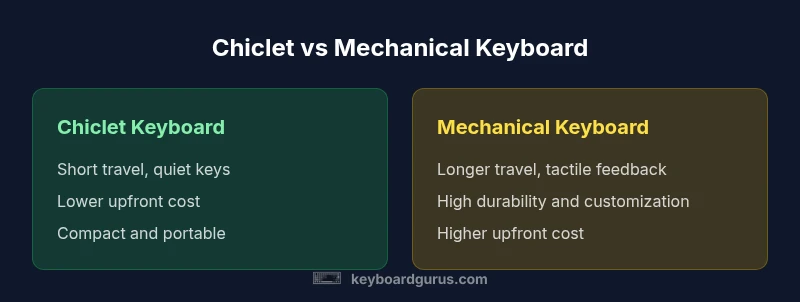
| Feature | Chiclet Keyboard | Mechanical Keyboard |
|---|---|---|
| Key travel | Short travel | Longer travel |
| Tactile feedback | Soft, limited feedback | Clear, selectable feedback (tactile/click) |
| Noise level | Low/noise | Moderate to high depending on switch |
| Durability | Moderate durability | High durability, longer lifespan |
| Customization options | Limited keycap/switch options | Extensive customization (switch types, keycaps, layouts) |
| Price range | Lower upfront cost | Higher upfront cost, more value over time |
| Best for | Office work, travel, casual typing | Gaming, programming, enthusiasts |
Advantages
- Lower upfront cost and broad availability
- Quiet operation suitable for shared spaces
- Slim form factors improve portability
- Simple maintenance and replacement parts
Drawbacks
- Limited tactile feedback compared to mechanical
- Lower durability under heavy use or gaming
- Fewer customization options and less macro support
- Potentially shorter lifespan in high-usage scenarios
Mechanical keyboards win for performance and customization; chiclet keyboards win for quiet, portable use.
Choose chiclet for quiet, portable office work and study setups. Choose mechanical if you prioritize tactile feedback, durability, and customization for gaming or professional workloads.
Got Questions?
What is a chiclet keyboard, and how does it differ from a mechanical keyboard?
A chiclet keyboard uses flat, low-profile keys with short travel, often found on laptops. Mechanical keyboards use individual switches under each key, delivering tactile or audible feedback and typically longer lifespan. The key difference is how the switch and keycap interact to create typing feel and noise.
A chiclet keyboard has flat keys with short travel, while a mechanical keyboard uses individual switches and offers more feedback and durability.
Is a chiclet keyboard better for travel or office work?
Yes for many users. Chiclet keyboards are lighter, slimmer, and quieter, making them convenient for travel and shared office spaces. They tend to be less expensive upfront and require less maintenance, though they may not satisfy heavy typists or gamers over time.
Chiclet keyboards are great for travel and office work due to their light, compact design and quiet operation.
Are chiclet keyboards good for gaming?
Chiclet keyboards can work for casual gaming, but they generally don’t match the performance and customization depth of mechanical boards. For competitive or long gaming sessions, a mechanical keyboard with the right switch and layout tends to deliver better accuracy and durability.
Casual gaming is fine on chiclet keyboards, but for serious gaming you’ll likely prefer mechanical options.
Do mechanical keyboards last longer than chiclet keyboards?
In most cases, mechanical keyboards offer longer lifespan due to sturdier switches and build quality. Chiclet keyboards may wear out sooner in high-usage environments, though modern chiclet boards have improved reliability.
Mechanical keyboards typically last longer because of durable switches and builds.
Can you customize a chiclet keyboard?
Customization on chiclet keyboards is limited—mostly cosmetic options like keycaps and backlighting. Mechanical keyboards support extensive customization through swappable switches, programmable layers, and varied keycaps.
Customization is limited on chiclet keyboards; mechanical keyboards offer broader options.
Which should I buy if I type a lot but share an office?
If you type a lot and share an office, consider a chiclet keyboard for quiet operation and portability, or a silent mechanical keyboard with damped switches. If you value feedback and long-term cost efficiency, a well-chosen mechanical keyboard is worth the extra cost.
For shared office typing, chiclet is often best for noise, but a quiet mechanical with good dampening can also work.
What to Remember
- Evaluate primary use first: typing vs gaming
- Prioritize noise tolerance in shared spaces
- Consider long-term cost of ownership
- Test multiple switch types if possible
- Balance portability with durability in your choice