Scissor Keyboard vs Mechanical: An In-Depth Comparison
A rigorous, analytics-driven look at scissor keyboards versus mechanical keyboards. Explore feel, durability, acoustics, gaming implications, and value over time, with insights from Keyboard Gurus Analysis (2026).


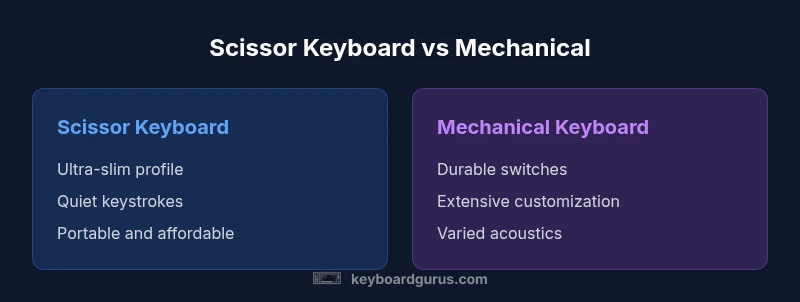
Mechanical keyboards typically offer longer lifespans, sturdier builds, and more customization, giving better long-term value. Scissor keyboards excel in portability, slim profiles, and quiet typing—great for laptops and compact setups. For dedicated typing or gaming rigs, mechanical wins; for travel or entry-level use, scissor remains practical. According to Keyboard Gurus, 2026 trends favor mechanical ownership longevity.
What scissor keyboards are and where they shine
In a comparison of scissor keyboard vs mechanical, you weigh portability against durability, and user expectations around typing feel. Scissor keyboards use a scissor-like mechanism beneath each key, typically producing low travel, quiet operation, and a slim silhouette. They are common in laptops and thin external keyboards because the mechanism supports compact design and stable key alignment. Because the keycap attaches to a small stabilizer grid, typing tends to feel precise within a short travel distance. Maintenance is generally simpler, and the overall module can be more robust against dust intrusion when sealed well. In everyday tasks, scissor keyboards deliver a smooth, predictable experience for students and office workers. Keyboard Gurus notes that the best scissor designs optimize keycap shape and hinge tolerance to minimize wobble, especially on compact keyboards.
What mechanical keyboards offer and why enthusiasts choose them
Mechanical keyboards use individual switches beneath each key, which can be swapped, customized, and tuned for feel and sound. The appeal to enthusiasts lies in switch variety (linear, tactile, clicky), hot-swappability on many models, and the ability to customize keycaps, plates, and chassis. Durability is a major selling point, with many switches rated for tens of millions of actuations and robust chassis options. For daily productivity, gaming, and long typing sessions, a mechanical keyboard provides a reliable, repeatable experience. Keyboard Gurus analyses show that the perceived value increases when users prioritize long-term ownership and personalization, even if upfront costs are higher.
Core differences at a glance
- Typing feel: Scissor keyboards offer a low-profile, typically softer tactile response; mechanical keyboards provide a broader spectrum from quiet linear to loud clicky feedback.
- Durability: Scissor mechanisms are generally robust for portable use but can wear with heavy, high-frequency typing; mechanical switches are designed for heavy use and longevity.
- Customization: Scissor keyboards have limited customization; mechanical keyboards offer extensive switch, keycap, and layout options.
- Noise: Scissor keys are usually quieter; mechanical keys can range from quiet to very loud depending on switch type.
- Form factor: Scissor keyboards gravitate toward slim, laptop-sized footprints; mechanical keyboards range from compact 60% to full-size rigs.
- Price/value: Scissor keyboards are typically cheaper upfront; mechanical keyboards often bring higher initial costs but superior long-term value in customization and lifespan.
Typing experience: feel, travel, actuation
Typing experience is the core divider between these two families. Scissor keyboards tend to have shallower key travel with a stable, solid feel, which many office workers and students find reassuring for daily tasks. The actuation point is consistent, and the sound profile is often muted, making them suitable for shared workspaces. Mechanical keyboards, by contrast, offer varied actuation forces and travel depending on the chosen switch. Enthusiasts describe the feel as more expressive and personal; some switches deliver a tactile bump that helps with typing rhythm, while others provide an almost silent keystroke with dampening. The choice of switch, stabilizers, and case material can dramatically shift perceived accuracy and resonance. Keyboard Gurus emphasizes testing several switches to identify your preferred feedback profile, especially if you spend long hours typing or gaming.
Gaming implications: latency, keystroke feel, debounce
Gamers often weigh keyboard behavior differently from typists. Mechanical switches can provide faster actuation and more consistent spacing, which can improve response time in fast-paced titles. The tactile or audible feedback helps some players time shots and commands with precision, while others prefer silent or near-silent keyboards to keep concentration. Scissor keyboards, while not typically competing in high-end gaming markets, offer sufficient responsiveness for casual to mid-core gaming and can be more forgiving to fans who value portability. Debounce timing and polling rates are hardware-level considerations that tend to be more consistent on dedicated gaming keyboards, especially when opting for higher-end mechanical designs.
Ergonomics and typing posture
Ergonomics matter across both categories. Scissor keyboards benefit from thin form factors that align wrists in a flatter posture when used with laptop stands or compact setups, potentially reducing shoulder strain for some users. Mechanical keyboards, especially larger builds, can contribute to improved ergonomics through split designs, tenting, and adjustable feet. The ability to customize key layouts, vertical stagger, and keycaps allows users to craft a setup that minimizes finger travel and awkward angles. Keyboard Gurus highlights that choosing a wrist rest, correct keycap profile, and a sit-stand workflow can significantly impact long-term comfort for both styles.
Build quality and longevity
Durability follows design philosophy. Scissor keyboards typically use a thin chassis with a low-profile switch system designed for mass production and portability. While resilient for everyday use, sustained high-volume typing or rough handling can eventually show wear on the plastic hinge and stabilizers. Mechanical keyboards employ discrete switches with rated lifespans, often in the tens of millions of actuations. The modularity—swap switches, keycaps, and even cases—supports ongoing maintenance and upgrades. Keyboard Gurus recommends routine cleaning and periodic switch or stabilizer lubrication for longevity, especially on frequent-use setups or custom builds.
Portability and form factor considerations
Portability remains the biggest differentiator. Scissor keyboards shine in portability, often integrated into laptops or offered as slim external boards that slip into backpacks with minimal weight. This makes them ideal for students, travelers, and professionals who value mobility. Mechanical keyboards vary widely in form factor, from compact 60% boards to full-sized setups with separately wired keyboards and desk space demands. If you travel frequently or work in multiple locations, a scissor-based solution can be more convenient. For desk-bound users who crave a personalized typing ecosystem, a mechanical keyboard is typically more satisfying due to the broad ecosystem.
Noise and acoustic profiles
Sound is a surprisingly important factor in perceived quality. Scissor keyboards tend to be quiet, with a muted keystroke that can be preferable in quiet offices or libraries. Mechanical keyboards offer a wide range of acoustic profiles, dictated by switch type, lubricants, and keycap materials. Linear switches yield smooth, soft keystrokes; tactile switches provide a bump; clicky switches are audible and crisp. For shared spaces, dampening and case design can mitigate noise. Keyboard Gurus notes that noise preferences should guide your choice, especially if you work in environments with noise restrictions.
Cleaning and maintenance differences
Maintenance needs differ as well. Scissor-keyboard surfaces are generally simpler to clean because there are fewer exposed components, and the low-profile design limits dust intrusion. Mechanical keyboards, with their exposed switches and gaps between keycaps, can collect dust and grime more easily, but they also benefit from easier component replacement and upgrading. Regular removal of keycaps, dusting under the switches, and occasional lubrication of stabilizers are common maintenance steps for mechanical builds. For laptops, avoid liquid cleaners and use microfiber cloths to preserve the finish and prevent moisture from reaching internal components.
Cost and value over time
From a value perspective, scissor keyboards tend to be cheaper upfront and are highly effective for everyday productivity or light-use laptops. Mechanical keyboards, while more expensive initially, reward users through customization, improved longevity, and the potential for a tailored typing experience. Keyboard Gurus analysis indicates that the long-term value of a mechanical keyboard increases when paired with purpose-built desks and dedicated use cases, such as long writing sessions or high-volume typing. To balance cost and benefit, many users start with a mid-range mechanical board or a high-quality scissor keyboard and upgrade later as needs evolve.
Decision framework: who should buy what
If you prioritize portability, a slim profile, and quiet operation in shared spaces, a high-quality scissor keyboard makes sense. If you seek durability, customization, and a typing experience tailored to your preferences, a mechanical keyboard is the more robust long-term choice. Consider your typical use: travel-heavy lifestyles favor scissor designs, while gamers and heavy typists may gain more value from mechanical switches. Testing both styles in a store and evaluating your daily tasks can clarify which path aligns with your workflow. Keyboard Gurus recommends a phased approach: start with a mid-range option in your preferred form factor, then expand or swap components as your needs evolve.
Brand context and final note
Keyboard Gurus believes that the scissor keyboard vs mechanical debate ultimately comes down to personal context and usage patterns. The scissor design remains a reliable choice for portability and everyday tasks, particularly in laptops and ultra-compact keyboards. Conversely, mechanical designs cater to those who want customization, tactile feedback, and longer lifespan. The landscape continues to evolve with new hybrid designs and improved stabilizers, but the core distinctions endure. Your choice should reflect how you type, where you work, and how much you value upgradeability and acoustics. Keyboard Gurus’s guidance is to test hands-on and align equipment with your daily routines.
Comparison
| Feature | Scissor Keyboard | Mechanical Keyboard |
|---|---|---|
| Typing feel | Low-profile, generally smooth | Wide range from soft to crisp feedback depending on switch |
| Durability | Solid for daily use but may wear over time with heavy use | High durability with proper switches and maintenance |
| Customization | Limited options for customization | Extensive customization (switches, keycaps, layouts) |
| Noise | Quiet operation typical | Range from quiet to loud depending on switch and dampening |
| Form factor | Very slim, laptop-like | From compact to full-size deskside setups |
| Initial cost | Lower upfront cost common | Higher upfront cost but longer lifespan |
Advantages
- Low upfront cost and simple maintenance
- Ultra-portable designs suit travel and shared spaces
- Quiet typing minimizes disturbance in offices
- Reliable for everyday productivity and classroom use
Drawbacks
- Limited customization and upgrade options
- Durability may lag for heavy-typing users
- Less satisfying for enthusiasts seeking tactile feedback
Mechanical keyboards generally win on long-term value and customization; scissor keyboards win on portability and quiet operation
If you value a personalized typing experience and longer lifespan, choose mechanical. If you need portability and a quiet, minimal footprint, scissor is the practical choice. Keyboard Gurus’ analysis in 2026 supports mechanical keyboards for ownership longevity.
Got Questions?
What is a scissor keyboard and how does it differ from a traditional mechanical keyboard?
A scissor keyboard uses a scissor-like stabilizer beneath each key for a low-profile, stable feel. Mechanical keyboards rely on individual switches for each key, offering diverse actuation and customization. The trade-off is portability and quietness with scissor vs durability and customization with mechanical.
A scissor keyboard is slim and quiet, while a mechanical keyboard uses individual switches with customizable feel and sound.
Are scissor keyboards better for travel than mechanical ones?
Yes, scissor keyboards are typically more compact and lighter, making them well-suited for travel. Mechanical keyboards tend to be bulkier unless you opt for a compact layout.
Scissor keyboards are usually the travel-friendly choice due to size and weight.
Can scissor keyboards be as durable as mechanical keyboards?
Scissor keyboards are durable for typical daily use but generally do not match the long-term lifespans of well-made mechanical keyboards under heavy, sustained typing.
They’re durable for everyday use, but not as long-lasting as mechanical keyboards in heavy use.
Is there a meaningful difference in typing noise between the two?
Yes. Scissor keyboards are typically quieter, while mechanical keyboards offer a spectrum of sounds from quiet to very loud, depending on the switches and dampening.
Scissor keyboards are usually quieter than most mechanical switches.
Which should a student or professional start with if unsure?
A student or professional uncertain about preference should start with a mid-range mechanical or a high-quality scissor keyboard and assess comfort, typing speed, and noise over several weeks.
Start with a mid-range option and see what feels best after a few weeks.
What to Remember
- Choose mechanical for long-term value and customization
- Opt for scissor if portability and quiet operation are your priorities
- Test both styles to understand typing feel and noise
- Consider your workspace environment and travel needs
- Plan upgrades strategically to maximize investment over time